Finance Team Productivity Software: 10 Tools for 2026
Your Finance Team Isn't Slow, Their Tools Are
Your month-end close is bottlenecked. Not by your team's skill, but by the tools sitting in their browser tabs.
Finance teams still run consolidations through emailed spreadsheets, approval threads, and chat messages. A 2023 survey of finance and accounting professionals found email plays a central role in how close tasks get managed (Trintech). The same survey found fewer than half of light email users felt they had decent visibility into what other teams were actually doing. That's the productivity drain in one number: the medium you depend on is the medium that hides the work.
Finance team productivity software is the category of automation, analytics, and workflow tools that replace this manual close work. Think automated reconciliations, intercompany eliminations, AFS generation, real-time dashboards, and spend controls layered over your accounting system. The point isn't to replace your ERP. The point is to stop your team from being the integration layer.
This guide walks through 10 tools that matter in 2026. Role-based use cases for controllers, group accountants, FP&A leads, and CFOs. Selection criteria so you don't buy software that just adds another tab.
One baseline worth setting before we start: finance teams using modern consolidation and close tooling routinely cut up to 4 days of manual data work from each cycle. That's not a marketing line, that's the gap between teams stuck in spreadsheet chaos and teams running automated workflows. The tools below close that gap.
What Is Finance Team Productivity Software?
Finance team productivity software is a category of platforms that automate repetitive accounting, reporting, and consolidation tasks so finance professionals can spend time on analysis and decisions, not data wrangling. It sits on top of your ledgers. It does not replace them.
That distinction matters. General accounting software, your QuickBooks, your Xero, your Sage, captures transactions. Productivity software acts on those transactions. It moves the trial balance through review. It eliminates intercompany balances. It generates the consolidated pack. It surfaces variances before the board meeting.
A financial management system, in the broader sense, automates and organizes all aspects of financial operations including planning, accounting, and reporting (SAP). Productivity tools are the workflow and automation layer that turns that captured data into finished output. Close-management tools, for instance, sit over your existing ERP and orchestrate the close itself, improving accuracy and throughput without replacing the underlying systems of record (Trintech).
The four major categories you'll evaluate:
- Accounting and reporting automation: Automates journal entries, reconciliations, and statement generation. Sits closest to the ledger.
- FP&A and budgeting: Rolling forecasts, scenario models, driver-based plans. Pulls actuals from your ERP, runs the analysis layer.
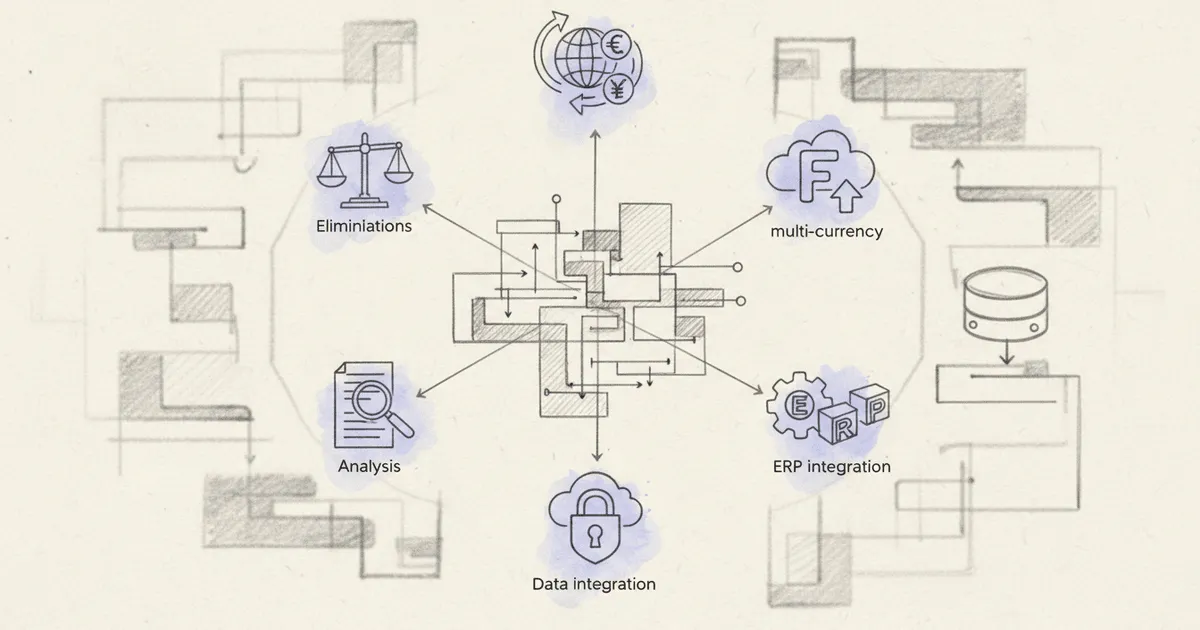
- Close and consolidation automation: Multi-entity consolidations, intercompany eliminations, FCTR calculations, foreign currency translation, audit trails. The productivity tier for group finance.
- Spend management: Expense workflows, AP automation, card controls. Removes manual approval routing.
The common mechanism across all four: eliminate copy-paste between systems and standardise workflows that currently live in someone's inbox. Every time a controller pastes a number from one spreadsheet to another, that's an error waiting to surface during audit. Every time an approval routes through email, that's a checkpoint with no audit trail.
The practical test for any tool in this category is simple. Does it remove a manual step that a person currently performs by hand? Does it replace a spreadsheet that travels by email? Does it create a record an auditor can trust? If the answer is yes to all three, it belongs in your stack. For a deeper look at how Quick Consols approaches this stack, see where finance fits in the broader category.

Why Email and Spreadsheets Are Killing Finance Productivity
Here's the awkward truth most finance leaders won't say out loud. Your team isn't slow. Your tools are.
Conventional wisdom during close week is to throw bodies at the problem. Pull in extra hands. Approve overtime. Push the deadline. But the actual bottleneck isn't headcount. It's version-control chaos in shared spreadsheets and approval threads buried six replies deep in someone's inbox.
Consider what email does to a focused workflow. The average interaction worker spends 28% of their workweek reading and answering email (Trintech), a statistic worth holding next to your finance team's close-week timesheet. And every time someone checks email, the research is brutal: 9 minutes to read, then another 16 minutes to refocus on the prior task. Nearly 25 minutes of productive work disrupted per email check. Multiply that by a close week with hundreds of intercompany queries flying around, and you don't have a productivity problem. You have a productivity crater.
What email and spreadsheets actually break:
- Audit trail. A consolidation entry approved by reply-all is not an audit trail. Auditors ask who approved what, when, and against which version of the trial balance. Inboxes don't answer that question.
- Version control. Three controllers editing the same group pack creates three versions of truth. Reconciliation becomes archaeology.
- Visibility. Status updates by email mean the group financial controller cannot see, in real time, which entities have closed, which are stuck on FCTR, and which have intercompany mismatches.
- Rework. Every emailed spreadsheet that comes back with a formula error triggers a downstream cascade. The NCI calculation breaks. The segmental reporting needs reworking. The AFS notes get redrafted.
The controllers on your team are not less capable than they were five years ago. The complexity of multi-entity, multi-currency groups has grown faster than the spreadsheet-and-inbox workflow can handle. That's the gap the next eight tools close, systematically, by replacing the email layer with workflow engines and the spreadsheet layer with structured, audit-ready platforms.
1. Group Consolidation Platforms: The Foundation of Multi-Entity Productivity
For any group with more than one entity, group consolidation belongs at the top of your finance productivity stack. Not in the middle. Not as a nice-to-have. At the top.
The reason is simple. Every other productivity gain downstream depends on a clean, automated consolidation. Your FP&A models pull from consolidated numbers. Your AFS draws from consolidated trial balances. Your board dashboards report on group results. If your consolidation is manual, every layer above it inherits the lag, the errors, and the audit gaps.
The features that matter:
- Automated intercompany eliminations. No more chasing entities for matching balances. The platform matches and eliminates inside the engine.
- Multi-currency translation. Consistent exchange rates applied across the group, with FCTR calculated automatically and accounting policies harmonised across subsidiaries.
- Audit-ready reporting. Full audit trail of every consolidation entry, every change, every minority interest calculation, with IFRS and US GAAP compliance baked in.
- ERP integrations. Direct connections to QuickBooks, Xero, Sage, and other accounting systems eliminate the trial balance import that currently lives in someone's spreadsheet.
- Partial consolidations and segmental reporting. Run consolidations by region, business line, or cost centre without rebuilding the model.
The productivity math is real. Finance teams using consolidation tools typically cut their close process meaningfully (Abacum), and leading organizations complete consolidated financial statements in roughly 4 days against an industry average of 6-10 days. That gap is not a small efficiency win. That is the difference between a finance team that ships board packs on day 5 and one still chasing intercompany mismatches on day 12.
The teams that benefit most: group financial controllers managing 5+ entities, CFOs of holding companies, and finance leaders running multi-currency operations across borders. For these teams, the unique angle most software roundups miss is this: consolidation IS productivity for group finance. Every other tool sits downstream of it.
For a closer look at our approach to finance team productivity software in the consolidation-first model, the comparison is worth reading before you scope vendors.
2. Financial Close Automation Software
Close automation software orchestrates the month-end checklist. It assigns tasks, tracks completion in real time, and replaces the status-update email chain that currently runs your close.
Think of it as project management built specifically for the financial close. Instead of a shared spreadsheet listing 200 tasks across 12 entities, you get a workflow engine that knows which reconciliations must complete before journal entries can post, which entities are blocking the consolidation, and which controllers have not yet certified their numbers.
What to look for when evaluating tools in this category:
- Task dependencies. A reconciliation that depends on a prior bank import should not show as ready until the import completes. The workflow engine handles this.
- Reconciliation matching. Automated matching of high-volume accounts: bank, intercompany, AR, AP. Exceptions surface for review, matches clear automatically.
- Journal entry automation. Recurring entries post on schedule. Validation rules catch malformed entries before they hit the ledger.
- Certification workflows. Controllers sign off on their entities. The platform records who certified what, when, against which version of the trial balance. That's an audit trail.
- Real-time status dashboards. The group financial controller sees every entity's progress in one view. No more chasing emails.
The established names in this category are BlackLine, FloQast, Trintech Cadency, and Nominal. Each has its own strengths around reconciliation depth, ERP integration breadth, and pricing model. Evaluate against your actual close pain points: if intercompany is your bottleneck, prioritise platforms with strong matching engines. If certification is your audit weak spot, prioritise the sign-off workflow.
Teams adopting close-automation platforms consistently report meaningful reductions in days-to-close. The gain comes from two places: removing the email layer that hides bottlenecks, and removing manual reconciliation work that ties up controllers in spreadsheet matching. For a deeper view on Quick Consols finance close workflows in a multi-entity context, the supporting guide on fixing multi-entity close is worth a read alongside the vendor shortlist.

3. Annual Financial Statement Automation Tools
Annual financial statement preparation is the hidden productivity sink most finance leaders underestimate. Ask any group accountant. The trial balance closes in days. The AFS takes weeks.
The time goes into formatting, cross-referencing notes, recalculating disclosures when a late adjustment hits, and chasing every external reference back to source. Each year, teams rebuild the same statement structure in Word or Excel, paste in updated numbers, and pray nothing broke between the trial balance and the disclosure note on related-party transactions.
What AFS automation actually looks like:
- IFRS and US GAAP compliant templates. The statement structure, the note framework, the disclosure language. All pre-built and version-controlled.
- Drill-down to trial balance. Click a number in the statement of comprehensive income, see the underlying ledger transactions. No more reverse-engineering the formula.
- Automated note disclosures. Tax notes, related-party notes, segmental reporting, financial instruments. The platform pulls source data and populates the disclosure.
- Change propagation. A late adjustment to the trial balance flows through every affected note automatically. The 3 a.m. recalculation before audit submission disappears.
- Audit-ready output. External auditors get a statement package with full traceability. Their queries shrink. The audit closes faster.
A real example worth examining: AJP Group, a holding structure with more than 30 companies, cut its AFS preparation time significantly after moving from manual statement assembly to automated AFS generation. The shift was not just speed. It was confidence. Knowing that a trial balance change at entity 14 would propagate through every consolidated note, automatically, removed the rework cycle that used to consume the second half of every audit season.
Tools worth evaluating in this category include Quick Consols AFS, CaseWare, and Workiva. Each handles the AFS problem differently. Quick Consols ties AFS generation directly to the consolidation engine, which matters when your statement notes pull from group-level numbers rather than entity-level trial balances. For the deeper specification of where financial fits in the AFS automation question, the IFRS-compliant statement generation framework is documented separately.
4. FP&A and Budgeting Platforms
FP&A software shifts your analysts from data wrangling to scenario modelling. That's the entire pitch, and it's the right one.
Most FP&A teams spend the first three weeks of the month rebuilding actuals into the budget template. They paste, they reformat, they reconcile to the trial balance, they argue with the controller about which version is final. By the time the numbers are ready for analysis, the month is half over and the CFO wants the forecast yesterday.
A proper FP&A platform breaks that cycle by connecting directly to the ERP and the consolidation system. Actuals flow in automatically. The budget structure lives in the platform, not in a 40-tab spreadsheet that crashes on save. Analysts spend their time on the model, not the maintenance.
Tools to evaluate: Anaplan, Cube, Vena, Pigment, and Abacum. Each has a different philosophy. Anaplan leans toward enterprise-scale modelling. Cube and Vena stay close to the Excel interface analysts already know. Pigment and Abacum lean into modern UX and faster implementation. Match the tool to your team's modelling depth and the complexity of your driver-based plans.
Features that separate good from great:
- Rolling forecasts. Re-forecast monthly without rebuilding the model.
- Scenario planning. Compare base, downside, and stretch cases side by side without copying the workbook.
- Driver-based models. Revenue ties to volume and price drivers, not hardcoded line items. Sensitivity analysis becomes a slider, not a rebuild.
- Board-ready outputs. Export to the format the board actually reads, not a screenshot of a pivot table.
The productivity gain is concrete. Analysts who move off spreadsheet-only workflows reclaim significant time each week previously spent on file maintenance, version reconciliation, and copy-paste between actuals and budget tabs. That reclaimed capacity is what turns an FP&A function from a reporting cost centre into a decision-support engine.
The make-or-break feature is integration. An FP&A platform that doesn't talk cleanly to your ERP and consolidation system will become another data silo. Test the integration before you sign the contract.
5. AI-Powered Financial Analytics and Dashboards
AI-powered financial analytics is the emerging productivity lever for 2026. Not as a buzzword. As a working tool that does specific, measurable things.
The capabilities worth caring about are narrower than the marketing suggests. Anomaly detection in transactions, where the platform flags entries that deviate from historical patterns before the controller has to spot them manually. Automated variance commentary, where the system drafts the explanation for why marketing spend ran 12% over budget, then the FP&A lead refines it. Natural-language querying of financial data, where the CFO types 'show me gross margin by region for Q3' and gets the answer in seconds rather than emailing for a report.
Firms with mature AI implementations achieve a 41% reduction in time-to-close, moving from roughly 6.4 days to 3.8 days (Abacum). That's a structural change in the close cadence, not a marginal gain.
Real-time dashboards replace the static monthly board pack. Instead of waiting for someone to assemble PowerPoint slides on day 10, executives see live group KPIs the moment the consolidation closes. Drill-down from group revenue to entity-level transactions in one platform. No PDF, no follow-up email, no 'can you pull the underlying detail for me?' thread.
Tools to evaluate in this category:
- Quick Consols Analytics for groups that need analytics tied directly to the consolidation engine, with drill-down from group KPIs to entity trial balance.
- Tableau with finance extensions for teams already standardised on Tableau elsewhere in the business.
- Mosaic for high-growth companies wanting a modern strategic-finance dashboard layer.
- Datarails for teams whose analysis lives in Excel and who want AI augmentation without leaving the spreadsheet.
The selection criterion that matters most: does the analytics layer pull from a single consolidated source of truth, or does it stitch together exports from multiple systems? Stitched analytics fail in the same way that emailed spreadsheets fail. They lose the audit trail. They drift from the underlying ledger. They look great until the auditor asks where a number came from.
For a closer view of how we think about finance team analytics built on top of consolidated group data, the platform documentation walks through the drill-down architecture in detail.

6. Accounts Payable and Spend Management Tools
Accounts payable is where manual work compounds fastest. Every invoice that lands in a shared inbox creates a small chain reaction: someone keys it, someone codes it, someone chases an approver. Multiply that across hundreds of vendors and you have a productivity sink hiding in plain sight.
AP automation tools collapse that chain. Platforms like Ramp, Bill.com, Tipalti, Stampli, and Brex pull invoices in through OCR, match them against POs and receipts, and route approvals based on policy. The invoice clerk stops being a data entry operator and starts being an exception handler.
The feature set worth looking for is consistent across the category:
- OCR invoice capture that reads PDFs and emailed invoices without manual keying
- Three-way matching between PO, receipt, and invoice with automated flagging of mismatches
- Virtual cards for controlled vendor spend with built-in policy limits
- Expense policies enforced at the point of submission, not after the fact
- ERP sync that pushes coded transactions straight into your GL
For high-volume teams, the productivity gain is substantial. Spend management platforms position themselves as essential for managing income, assets, and expenses (Ramp) with real-time visibility and automated controls to reduce manual work and errors. That framing matters because the real value isn't just speed. It's the controller catching off-policy spend before it hits the GL.
Think about the typical month-end scramble. A team without AP automation spends days reconciling corporate card charges against receipts, chasing missing approvals, and posting late accruals for invoices that sat in someone's inbox. A team with AP automation has those transactions coded, approved, and synced in near real-time.
The spend visibility piece is what controllers and CFOs care about most. When every transaction carries category, cost centre, and policy metadata at the point of capture, segmental reporting becomes a query rather than a project. Off-policy spend gets flagged before it compounds into a variance conversation at month-end.
For multi-entity groups, the integration story matters even more. AP tools that sync cleanly with Xero, QuickBooks, Sage, and NetSuite across multiple legal entities give you a consistent spend layer feeding into consolidation without manual journal reposting.
7. Accounts Receivable and Collections Automation
Accounts receivable is the mirror image of AP, and it's where cash conversion lives or dies. The traditional AR process leans on credit controllers sending chase emails, reconciling payments against open invoices by hand, and fielding disputes through a tangle of email threads. It's slow, it's error-prone, and it ties up the people who should be having strategic conversations with customers.
AR automation platforms flip that workflow. Tools like HighRadius, Versapay, Chaser, and Quadient AR send dunning sequences automatically, apply incoming payments using AI matching, and give customers a self-service portal to view invoices, raise queries, and pay.
The core features that move the needle:
- Automated dunning that escalates politely without manual scheduling
- Cash application AI that matches payments to invoices even when remittance data is messy
- Customer payment portals that remove friction from settlement
- Dispute management that captures issues in a structured workflow rather than an email chain
The outcome teams report is meaningful. Days sales outstanding tends to drop noticeably for teams that move from manual AR to automated collections, freeing working capital that was previously trapped in the receivables ledger. The exact number varies by industry and customer mix, but the directional improvement is consistent.
The productivity story isn't only about speed. It's about what your credit controllers do with their time. Instead of sending the same chase email for the fifteenth time, they're investigating genuine disputes, building relationships with key accounts, and flagging credit risk before it becomes a write-off.
For groups with multiple billing entities and currencies, AR automation gets even more valuable. Each subsidiary may have its own customer base, invoice format, and collection cadence. A centralised AR layer gives the group CFO a single view of receivables across the consolidated entity, while local controllers retain operational control.
The data quality benefit feeds straight into consolidation. Clean, automatically applied cash means fewer reconciling items between the AR sub-ledger and the GL. That means a faster close, a tighter audit trail, and fewer late-night journal entries on the last day of the month.
If collections is still a manual exercise in your finance team, AR automation is one of the highest-leverage productivity moves you can make.

8. Reconciliation and Intercompany Matching Software
Reconciliation is the single biggest time sink in the close. Bank reconciliations, balance sheet reconciliations, intercompany matching, sub-ledger to GL ties. Each one looks small on its own. Stack them across multiple entities and currencies and you've built a wall of manual work that pushes the close from days into weeks.
Reconciliation platforms like BlackLine, Adra by Trintech, ReconArt, and SolveXia exist to dismantle that wall. They ingest data from bank feeds, ERPs, and sub-ledgers, apply matching rules, and surface only the exceptions that actually need human judgement.
The features that separate serious reconciliation software from glorified spreadsheet trackers:
- Automated matching rules that handle one-to-one, one-to-many, and many-to-many ties
- Exception management that routes unmatched items to the right owner with clear deadlines
- Audit trail capturing every match, adjustment, and sign-off for the external audit file
- Certification workflows that lock reconciliations once signed off and prevent silent edits
Intercompany matching deserves its own paragraph. For any group with cross-entity transactions, mismatches between subsidiary ledgers are a chronic source of investigation work. Entity A books a management fee receivable that Entity B never recognised. Entity C invoices Entity D in EUR while D records the payable in USD at a different rate. Each of these creates a reconciling item that someone has to chase down before consolidation can complete.
Dedicated intercompany matching, ideally embedded in your consolidation software rather than bolted on, prevents the days-long investigations that derail close timelines. Automated intercompany elimination, anomaly detection, and trial balance mapping for IFRS and GAAP reporting are now table stakes (Wolters Kluwer) for the category.
This is where the ERP versus dedicated consolidation software conversation gets sharp. ERPs handle transactional reconciliation well. They generally do not handle group-level intercompany matching with the precision multi-entity groups need, particularly when fctr, partial consolidations, and NCI calculations enter the picture. If you're evaluating tools and want a checklist for what to interrogate during vendor calls, the full breakdown of what to look for in a consolidation demo is a good starting point.
Reconciliation automation pays back fast because it attacks the most repetitive, lowest-value finance work directly. Cleaner reconciliations also mean an audit-ready position year-round, not just at year-end.
9. ERP and Accounting System Integration Layers
Integration platforms are the unsung hero of finance productivity. They don't show up in board decks. They rarely appear on vendor comparison charts. They quietly determine whether the rest of your stack actually delivers the productivity gains it promises.
The principle is simple. Productivity software fails if data still has to be moved manually between systems. A best-in-class AP tool that requires CSV exports into your ERP every week has just reintroduced the manual work it was supposed to eliminate. The same applies to consolidation, FP&A, and analytics layers.
Finance integration connects ERP and other business systems to eliminate manual data transfers and reduce errors across financial operations (NetSuite). That's the whole game.
Two categories of integration matter:
- General iPaaS platforms like Workato and Boomi, which connect arbitrary systems via APIs and let you build custom data flows
- Native connectors built directly into finance software for Xero, QuickBooks, Sage, NetSuite, and other accounting platforms
The rule of thumb: prefer native API integrations over CSV uploads. Native connectors are maintained by the vendor, update as schemas change, and typically support real-time or near-real-time sync. CSV-based integration is functional but fragile. Every format change breaks the pipeline. Every manual export reintroduces the risk of stale data feeding downstream reports.
For multi-entity groups, the integration question gets more nuanced. Different subsidiaries often run different accounting systems. One entity on Xero, another on QuickBooks, a holding company on Sage. The consolidation layer has to ingest trial balances from each, apply currency translation, and feed into a single source of truth without manual reposting.
This is the practical reason Quick Consols supports direct sync with Xero, QuickBooks, and Sage. Manual trial balance uploads are exactly the kind of repetitive task that erodes finance team productivity. Eliminating them means group accountants spend their time on consolidation logic and review, not on data wrangling. If you want to see how the full stack ties together, Quick Consols's take on finance team productivity walks through the integration model in more detail.
When you evaluate any new finance tool, the integration audit is non-negotiable. Ask which systems it connects to natively, how often data syncs, whether the connection is bi-directional, and what happens when source data changes after sync. The answers will tell you whether the tool will compound productivity or quietly add to your manual workload.
10. Workflow and Task Management for Finance Teams
Finance-specific task management beats generic project tools, full stop. Asana and Trello are fine for marketing sprints. They were never built for the recurring, deadline-driven, dependency-heavy reality of a financial close.
Finance task platforms like FloQast, Numeric, and Notion with finance templates are designed around the close calendar. They know that bank reconciliations have to finish before the cash GL can be locked. They know that the consolidation can't run until every subsidiary has submitted a signed trial balance. They model these dependencies natively.
The core features that distinguish finance task tools from generic alternatives:
- Recurring close calendars that auto-generate the monthly checklist with the right tasks in the right order
- Role-based assignments so the right preparer and reviewer are mapped to each task
- Dependency tracking that prevents downstream work from starting before prerequisites complete
- Audit logs capturing who did what, when, and what they signed off on
The productivity gain is partly about speed and partly about what stops happening. The 'where are we on the close?' status meeting disappears because the dashboard already shows it. The Friday afternoon scramble to find out who owns the inventory reconciliation disappears because the assignment is visible. The post-close finger-pointing about missed steps disappears because the audit log is unambiguous.
This is especially valuable for hybrid and remote finance teams. When your group accountant is in Cape Town, your controller is in London, and your CFO is in New York, you cannot run a close on Slack messages and verbal updates. A shared task layer becomes the single source of truth for close status.
For finance teams still working long hours through every close, task automation is one of the most direct levers to pull. The overtime problem in finance departments is usually not a headcount problem. It's a coordination problem disguised as a workload problem. If you want to see the details on why finance teams keep hitting overtime walls, that breakdown is worth a read.
The pattern across mature finance teams is consistent: task management is the connective tissue that makes the rest of the productivity stack actually deliver. Without it, you have a collection of tools. With it, you have an orchestrated close process that runs predictably month after month.

How to Choose the Right Finance Productivity Software for Your Role
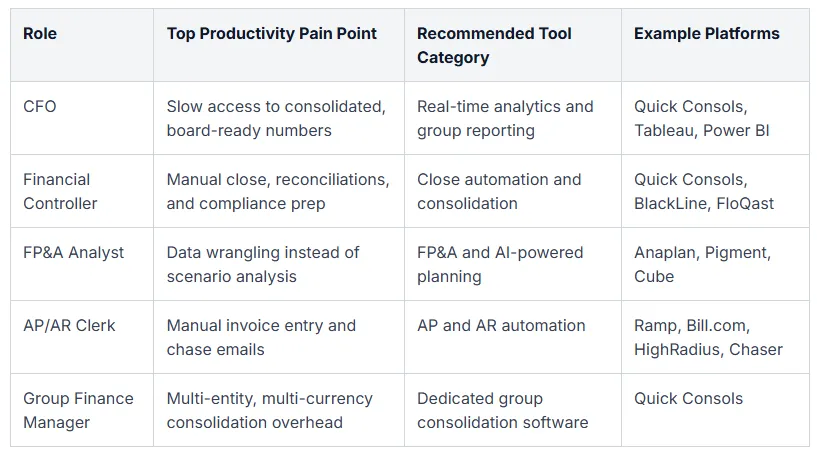
The productivity software conversation usually flattens into a generic 'best tools' list. That misses the point. The right tool depends entirely on the role you're optimising for. A CFO's productivity problem is not a controller's productivity problem, and neither resembles what an AP clerk faces every day.
Start by being honest about which role's pain you're solving for. Then work outward from there.
CFOs care about strategic visibility. Their productivity is unlocked by real-time analytics, board-ready reporting, and forecasting tools that let them answer 'what if?' questions without waiting for the FP&A team to rebuild a model. The category that matters here is consolidation paired with embedded analytics, not transactional automation.
Financial controllers live in the close. Their productivity comes from close automation, consolidation software, reconciliation platforms, and compliance tooling that produces audit-ready outputs without manual reformatting. Controllers also care about segmental reporting, cost centres, and profit centres being accurate by default rather than reconstructed at month-end.
FP&A analysts need scenario planning, variance analysis, and AI-powered insights that surface anomalies in the data without manual digging. Their productivity is measured in how many strategic questions they can answer per week, not how many cells they update.
AP and AR clerks need invoice automation, payment workflows, and exception handling. The productivity gain is direct: fewer keystrokes, fewer email chases, fewer reconciling items.
Group finance managers sit at the intersection. They need everything the controller needs, plus multi-entity consolidation, multi-currency translation, intercompany matching, fctr handling, NCI calculations, and partial consolidations. Their productivity question is uniquely about coordination across entities.
A simple decision framework helps:
- Count your entities. One entity, one ERP, no consolidation tool needed. Multiple entities, dedicated consolidation belongs in your stack.
- Map your currencies. Multi-currency complexity demands tools with built-in translation, not workaround spreadsheets.
- Audit your integrations. Which systems must talk to which? Where are the manual handoffs today?
- Size your team. A two-person finance team has different priorities to a 30-person group function.
Get those four answers clear before you sit through another demo. The right tool stack becomes much easier to scope when you know exactly which role and which complexity you're solving for.
Frequently Asked Questions
What is finance team productivity software?
Finance team productivity software is a category of platforms that automate repetitive accounting, reporting, consolidation, and AP/AR tasks so finance professionals can focus on analysis and decision-making. It sits above general accounting software and adds workflow automation, integration, and reporting layers. The goal is to eliminate manual data entry, reconciliation chasing, and report assembly across the finance function.
How does finance productivity software reduce month-end close time?
It compresses the close in four ways: automated reconciliations, elimination of manual data transfers between systems, workflow orchestration of close tasks with clear ownership and dependencies, and real-time visibility into close progress. Teams using consolidation tools typically cut their close process meaningfully, and AI-mature finance functions push that improvement further. The cumulative effect is fewer days to a signed-off consolidated trial balance.
What is the ROI of finance team productivity software?
ROI shows up in three places: time saved per close, error and rework reduction, and analyst hours redirected to value-add work. Quick Consols typically reduces manual work by up to four days per consolidation cycle, which compounds across twelve closes a year plus interim reporting. Add in the audit efficiency gain from a clean, automated trail and the payback is usually visible within a single reporting cycle.
Why do finance teams still use email and Excel if better tools exist?
Inertia, perceived switching cost, and tool sprawl. Teams know spreadsheets and email are slowing them down, but the perceived effort of implementing new software, training the team, and migrating data feels larger than the ongoing pain. Problem-first framing helps: quantify the days lost per close, the errors caught late, and the audit findings that traced back to manual handoffs. Once the cost is visible, the switching decision becomes obvious.
How does productivity software help multi-entity and group finance teams?
Multi-entity groups face complexity that single-entity ERPs cannot solve: intercompany eliminations, multi-currency translation including fctr handling, NCI calculations, partial consolidations, and group-level segmental reporting. Dedicated consolidation software exists precisely for these problems. Productivity for groups means a single source of truth across subsidiaries, automated eliminations, and IFRS or US GAAP-compliant outputs without manual reformatting at every close.
What should I look for when evaluating finance productivity software?
Focus on six dimensions: integration ecosystem with your ERP and accounting platforms, depth of automation across reconciliation and consolidation, completeness of audit trail, role-based access controls, scalability as entity count grows, and the maturity of analytics and AI capabilities. Run a structured demo with your real data where possible. Tools that look identical in marketing materials behave very differently when fed your actual trial balances.
Ready to Transform Your Finance Team's Productivity?
The slow close isn't a headcount problem. It's a tooling problem. Adding more people to a manual process accelerates it briefly and then plateaus. Replacing the manual process with automation compounds for years.
That's the choice in front of most finance leaders right now. Hire your way out of spreadsheet chaos, or build a productivity stack that does the repetitive work for you. The first option is expensive and temporary. The second is investment that pays back every month, every quarter, every audit cycle.
For multi-entity groups, the foundation of that stack is dedicated consolidation and analytics software. Once your group trial balances, intercompany eliminations, multi-currency translation, and consolidated reporting run automatically, the rest of your productivity tooling has clean data to work with. Without that foundation, every other tool ends up patching over a broken consolidation process.
Quick Consols is built for exactly this layer. Automated intercompany eliminations, multi-currency translation with fctr handling, partial consolidations, NCI calculations, IFRS and US GAAP-compliant statements, and direct integration with Xero, QuickBooks, and Sage. Unlimited users, month-to-month pricing, and a finance-first product built by chartered accountants who know what audit-ready actually means.
If you're running a multi-entity group and your close still leans on spreadsheets and email, explore Group Financial Consolidation with Quick Consols. Book a demo with your real trial balances, see the consolidation run live, and judge the productivity gain against the close you ran last month. The fastest way to know whether the right tooling can replace days of manual work is to watch it happen on your own data.

Share this Article


Get in Touch
If you have any questions about our Consolidation Software, send us a message below and we'll get back to you ASAP.